


Elephant Insurance Mobile
3.851.00 Reviews
App Specs
- Version
- 1.6.5
- Updated On
- License
- Free
- Downloads
- 10,000+
- Developer
- Elephant Insurance
- Categories
- Auto & Vehicles
- Platform
- Android
Screenshots

 Analysis by AppCompare
I approached Elephant Insurance Mobile as the kind of tool I would open when I need to deal with my car insurance quickly rather than sit at a desk. It is a free auto and vehicle app from Elephant Insurance, built around access to an existing auto policy. That focus matters: this is not trying to be a general driving assistant, a roadside community, or a replacement for every insurance conversation. Its value is in putting policy-related access closer at hand when I am away from a computer.
My first impression is that the app makes most sense for an Elephant customer who wants a more direct mobile route to insurance information. The store summary presents that purpose simply, and the product’s current version is 1.6.5. It has a 3.8 average from around 120 ratings, with over 10K installs, so there is enough public use to suggest that it is more than a purely experimental download, while still being a relatively small app compared with major all-purpose finance platforms.
How Elephant Insurance Mobile feels in everyday use
I find that the app’s value depends on treating it as a ready route to policy information, not something to explore for the first time under pressure. A quick practice visit can help me learn where I would start and whether the text and controls suit my phone setup. That preparation matters most when an ordinary policy question comes up away from home.
Readable navigation for a policy-focused task
When I review an insurance app, I care less about visual novelty and more about whether I can understand where I am and what to do next. Elephant Insurance Mobile benefits from having a narrow purpose. A customer is not asked to browse unrelated services or learn a complicated financial dashboard before reaching the policy area. That limited scope can make the experience easier to approach, particularly for someone who only opens the app occasionally.
The best way to use it is with a clear task in mind. I would open it before a trip to check the policy information I may need, or after receiving an insurance document and wanting to review it without searching through email. Keeping the goal specific reduces the chance of getting lost in an app that I might otherwise use only a few times a year.
That said, occasional use creates its own challenge. An interface that feels obvious after several visits may not be memorable after a long gap. I would not assume that every customer will immediately know which section contains the detail they need, especially if they are already stressed by a collision, a vehicle change, or a question about coverage. Clear labels and a predictable return path are more important here than decorative design.
For people with reading difficulties, the practical test is whether the wording is direct and whether important actions stand apart from secondary information. I found the app’s focused role helpful in that respect, but users who depend on enlarged text, strong contrast, screen readers, or other device-level assistance should check how the current build behaves with their own phone settings. The experience can vary according to operating system, display configuration, and personal accessibility tools.
Worth Reading Before You Choose

EA SPORTS FC Mobile 26 Is a Bigger Football Game, but It Takes Time

Flipboard Shows What News Apps Must Do Beyond the Feed

Switching to Android Auto Means Rethinking Your Driving Routine

Google Calendar Makes a Crowded Week Easier to Manage

Ludo King Makes the Most of the Minutes Between Plans

Baby Panda World Brings Quick Play to Modern Phones, but Its Game Library Feels Busy
Motor and sensory considerations that affect real tasks
Insurance work is often done with one hand, in poor lighting, or while attention is divided. I would avoid using any policy app while driving, of course, but even as a passenger I may be holding a phone awkwardly, wearing gloves, or dealing with glare. A useful mobile design should not make a customer perform delicate gestures or tap tiny controls repeatedly just to reach routine information.
Elephant Insurance Mobile is most suitable when I can stop somewhere safe, hold the phone steadily, and give the screen my full attention. That is a modest requirement, but it is worth stating because a car-related app naturally invites use around travel. If I were pulled over, standing beside a damaged vehicle, or trying to help another person, I would prefer a simple, calm workflow and would not rely on the phone as my only way to resolve an urgent situation.
Users with tremors, limited dexterity, or fatigue may find repeated tapping or scrolling more demanding than it appears on paper. The app’s value is therefore strongest for short, planned checks rather than long sessions. I would prepare the phone before an important journey, make sure the device responds reliably, and keep any essential policy information available through another safe method as well.
For sensory needs, the surrounding phone settings are part of the experience. Larger text, display zoom, reduced motion, a screen reader, or a high-contrast configuration may help, but I would test those combinations before an emergency. An app can appear straightforward in its default presentation and still become awkward when text is enlarged or controls are read aloud. That is not a criticism unique to this product; it is a reason to test the exact setup that a customer depends on.
Situational access: where the app helps most
The strongest use case I can imagine is a routine policy check before leaving home. I might be lending my car to a family member, preparing for a longer drive, or simply wanting to confirm that I can reach my insurance details without opening a laptop. In that situation, a dedicated mobile app is more convenient than navigating a browser, remembering a bookmarked page, or searching through old messages.
A second useful scenario is handling a minor administrative question while away from home. If I am at a repair shop or discussing a vehicle with someone else, having policy access on the phone can reduce the need to postpone the conversation. It does not remove the need to read carefully, but it can shorten the distance between the question and the relevant account information.
The app may also suit customers who are uncomfortable with desktop websites. A phone is often the device people already use for messages, maps, and daily tasks, so keeping insurance access in the same environment can feel less intimidating. The age rating is Everyone, which fits the app’s practical, non-entertainment purpose, although an age label alone does not tell me how comfortable every person will be with account and policy language.
There is an important trade-off here. A dedicated app can be easier to find than a mobile browser page, but it adds another application to maintain and remember. If I rarely need policy information, the browser may be sufficient. If I am already an Elephant customer and want a more direct route to my policy, the app has a clearer reason to exist.
Where it sits beside the usual alternatives
The closest alternative is the insurer’s website in a mobile browser. A browser avoids installing anything and can be preferable on a shared phone, a device with limited storage, or a phone where app permissions and updates are tightly controlled. It may also be the better choice for someone who wants to compare information across several insurers without switching between dedicated apps.
Elephant Insurance Mobile has the opposite advantage: it gives the customer a named place for Elephant-related policy access. That can reduce the number of steps between unlocking the phone and starting an insurance task. The difference is not necessarily a larger feature set; it is the convenience of a dedicated entry point.
Email and saved documents remain useful alternatives too. They can provide a record that is easy to forward or print, while the app is better suited to checking information during an ordinary mobile moment. I would use the app for quick access, but I would not delete important correspondence simply because a policy app is installed.
General finance apps are not a close substitute. They may organize bills or accounts, but they do not automatically provide the same insurer-specific context. Conversely, a roadside assistance app or driving-safety tool would serve a different purpose. Choosing Elephant Insurance Mobile makes sense when the task is connected to an Elephant auto policy, not when I need navigation, vehicle diagnostics, or broad emergency support.
Small workflows that make the experience less stressful
One useful habit is to open the app during a calm moment rather than waiting until I need information urgently. I would sign in, identify the route to the main policy area, and note whether the text remains comfortable at my preferred display size. That short rehearsal can matter for people who experience anxiety with financial forms or who need extra time to interpret dense wording.
A second habit is to separate reading from decision-making. I would review a policy detail first, then pause before assuming that it answers a different question. Insurance terms can be easy to misread when I am standing in a noisy place or trying to help someone else. The app can make information available, but it cannot replace careful interpretation or a conversation with the insurer when the situation is unclear.
A third is to plan for low-attention moments. If I know I will need insurance information at a repair appointment, I would use the app before arriving, when I have better lighting and fewer distractions. This is especially helpful for users with visual processing difficulties, hearing-related communication needs, or limited concentration in busy environments. The aim is not to rush the interaction; it is to move the difficult reading to a better setting.
I would also keep the app’s role narrow in my mind. It is a policy-access tool, so I would not treat it as proof that every insurance question can be solved inside the interface. If a matter involves urgency, disagreement, or information that needs explanation, a direct support channel may be more appropriate. The app is most useful as a first point of access, not as a promise of instant resolution for every circumstance.
Remaining barriers before I would rely on it
The biggest barrier is context. A phone screen is not automatically easier than a website for everyone. People with low vision may need specific text and contrast settings; people with motor limitations may need generous touch targets; and people who use assistive technology may need consistent labels and focus order. I would test those needs personally rather than assuming that a simple-looking app will work equally well for every customer.
Another barrier is the emotional setting in which insurance apps are used. A collision, a repair bill, or a sudden question from another driver can make even familiar navigation feel difficult. A customer who needs step-by-step guidance, spoken support, or help understanding policy language may find that the app alone does not provide enough reassurance. In those moments, a human contact route is a better companion to the app than repeated attempts to find an answer on the screen.
There is also the practical issue of account access. Any policy app is only useful if I can get into the relevant account when I need it. I would not wait until a trip or incident to discover that I have forgotten credentials or that my phone settings interfere with sign-in. Preparing in advance is particularly important for older users, people with memory difficulties, and anyone who relies on a support person to help with digital tasks.
For someone who manages several insurance providers, the dedicated nature of the app may become a disadvantage. Keeping multiple insurer apps can create confusion, especially when icons, login routines, and document locations differ. In that case, a browser-based approach or a carefully organized document system could be simpler. Elephant Insurance Mobile is not automatically the best answer simply because it is free.
Who I would recommend it to
I would recommend Elephant Insurance Mobile to an Elephant customer who wants quick mobile access to an auto policy and prefers a dedicated app over a browser. It is a sensible fit for people who handle their own routine policy checks, use a phone comfortably, and can prepare their account access before they need it. The free price removes the cost barrier, while the Everyone rating makes it broadly approachable in terms of listed content.
I would be more cautious about recommending it as the sole insurance resource for someone who needs extensive assistance with reading, touch control, account navigation, or policy interpretation. That person may still benefit from installing it, but I would pair it with a trusted helper, a larger screen, or direct support. The right question is not whether the app is simple in general; it is whether its particular workflow matches the user’s abilities and the situation in which it will be used.
I would also suggest skipping it if an Elephant customer is satisfied with the mobile website and does not want another app on the phone. Installation is not an achievement by itself. The dedicated shortcut is worthwhile only when it saves meaningful effort or makes policy access easier to remember.
Elephant Insurance Mobile has a clear, useful place in the Auto & Vehicles category. In my experience, its main strength is focus: it brings Elephant policy access into a familiar mobile setting without pretending to be a complete driving toolkit. Its main weakness is the same thing viewed from another angle: a focused policy app may not offer enough help when the customer needs explanation, urgent guidance, or a highly personalized accessibility experience.
Elephant Insurance Mobile was released on March 28, 2023, and supports Android 8.0 or later. Those details make it suitable for many existing Android phones, though I would still check the device’s actual software and display behavior before depending on it. With a 3.8 average and a modest but growing user base, I see it as a practical convenience rather than an essential app for every driver.
My inclusive verdict is straightforward: use it as a prepared access point, not as your only safety net. If the interface works comfortably with your phone settings and you already insure a vehicle with Elephant, it can save time during ordinary policy tasks. If you need extensive assistance or expect an insurance emergency, keep a human support option and another way to access important information. That balanced approach lets the app do what it is good at while respecting the different abilities and real-world situations of the people who may need it.
Pros
- Quick access to policy details
- documents
- and coverage information.
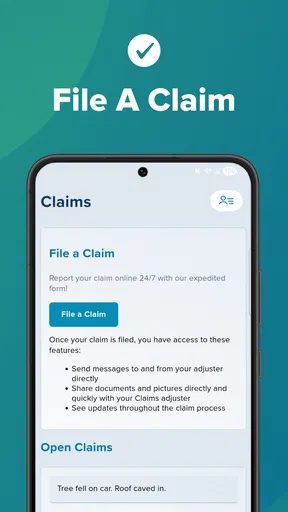
- In-app tools can simplify claims reporting and status tracking.
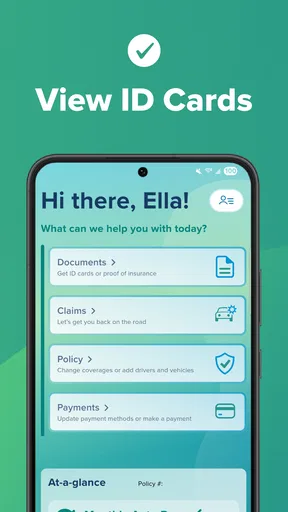
- Digital ID cards are convenient when driving or handling roadside checks.
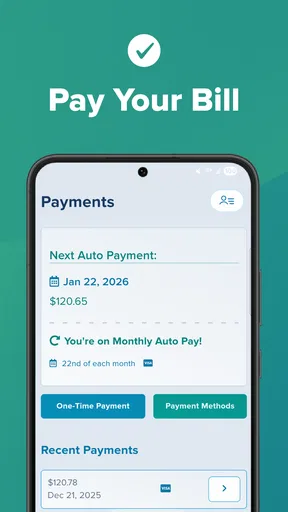
- Payment features help users manage premiums without calling support.
- Useful driving insights may encourage safer habits and better awareness.
Cons
- Some features may require an active Elephant Insurance policy to use.
- App usefulness depends on your location and the policies available there.
- Claims involving complex damage may still require phone or human support.
- Driving-tracking features can raise privacy concerns for some users.
- Occasional login or verification issues may interrupt access to account tools.
FAQs for Elephant Insurance Mobile
What can I do with the Elephant Insurance Mobile app?
Elephant Insurance Mobile is designed to give policyholders convenient access to their car insurance information from a phone. Depending on your policy and account, you can typically view policy documents, check cover details, make or manage payments, update personal information, request assistance, and contact customer support. The exact tools available may differ by region, policy type, and whether you are the policyholder or an additional driver.
Can I use Elephant Insurance Mobile to manage my policy and payments?
Yes, the app is intended to simplify everyday policy management without requiring you to call the insurer for every request. After signing in, you may be able to review your current cover, access important documents, see payment information, and make eligible changes to your account. Payment options and policy-editing features can vary, so some requests may still need to be completed through the Elephant website or customer service.
Does Elephant Insurance Mobile support accident reporting or claims?
The app may provide access to claims-related services, such as starting a claim, finding relevant contact details, or receiving guidance after an incident. Before relying on it during an accident, make sure you understand the required reporting process and keep emergency services as your first contact when necessary. Available claim features can depend on your policy, location, and the circumstances of the incident.
Is Elephant Insurance Mobile secure to use?
The application is built to provide account access through a mobile device, but users should still follow good security practices. Download it only from the official Google Play Store or Apple App Store, use a strong and unique password, and avoid signing in on public or shared devices. Keep your phone and the app updated, and contact Elephant promptly if you notice unfamiliar account activity.
What should I do if I cannot log in or the app does not work properly?
First, check that your internet connection is stable and that you are entering the same login details used for your Elephant online account. Updating the app, restarting your phone, or resetting your password may resolve common problems. If the issue continues, use the official Elephant website or customer-service channels for assistance. Some features may also be temporarily unavailable during maintenance or after an app update.


